

What Text-to-CAD means
Text-to-CAD is the generation of a 3D CAD model from a written description: you type what the part is, with its dimensions, and software builds the geometry.
The term covers very different outputs, and the difference decides whether an engineer can use the result:
| Output | What you get | Can you edit it like a normal part? |
|---|---|---|
| Mesh (STL, OBJ) | A surface made of triangles | No: fine for a render or a 3D print, not for design work |
| Solid without history (STEP, B-rep) | Exact geometry, but one "dumb" body | Partly: direct edits only, no sketches or dimensions to change |
| Native part with a feature tree | Sketches, extrudes, revolves, holes, fillets, in your CAD software | Yes: change a dimension and the part rebuilds |
MecAgent produces the third kind. It does not generate a shape and import it: it operates the CAD software feature by feature, so the part it delivers has the same sketches and features as one you would have modeled by hand.
For how the different approaches work under the hood and what recent research shows, read Text-to-CAD, explained.
How Text-to-CAD works in MecAgent
- Describe the part in the MecAgent chat bar, step by step, with all the dimensions that matter. Attach a spec sheet, a PDF, photos or a sketch if they help.
- The agent plans the features it needs and shows the plan as a live Task Progress.
- It builds the part in your CAD software, creating each sketch and feature, checking the result and correcting itself.
- You refine in plain language: "make the wall 3 mm", "add four M3 bosses in the corners".
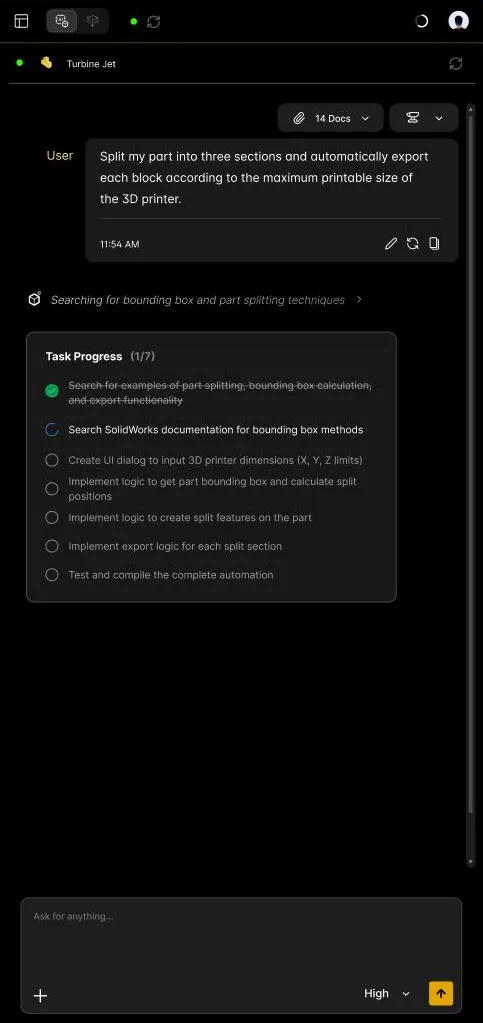
Two ways to run it:
- Live, with the CAD Agent, in your open SOLIDWORKS or Inventor session. Best when you iterate and want to see each change.
- In the background, as a Background Task: send a written brief or a spec sheet, keep working, and collect the modeled part when it is ready. Background Tasks start with the Starter plan.
Prompts that work, and why
A good Text-to-CAD prompt reads like a brief to a colleague: what to build, with numbers and references.
Create a flange with 6 M8 holes, 10 mm thickness, outer diameter 120 mm.
Model a turbine wheel Ø120 mm with 6 blades, 6 splitter blades and a Ø12 H7 bore with keyway.
A rectangular aluminium enclosure 120 × 80 × 40 mm, 2 mm walls, open top, four M3 bosses Ø6 mm in the corners, 1 mm fillets on outer edges.
The same request, two ways:
| Too vague | Precise |
|---|---|
| Add holes in the corners of the plate. | Add four Ø5 mm through holes, 10 mm from each edge, at the corners of the plate. |
| Create a car. | Model the wheel hub: Ø150 mm flange, 5 × M12 holes on a Ø112 mm pitch circle, Ø57 mm center bore, 12 mm thick. |
Three habits make the difference:
- Give every dimension that matters. A dimension you leave out is a dimension the agent has to guess.
- Name references. "On the top face", "between the two selected faces", "concentric with the bore".
- Build in steps for complex parts. Base shape first, then the features, then the finishing touches.
More techniques are in the user guide: how to prompt and prompting techniques.
Beyond a single part
Text is one input among several, and a part is rarely the end of the job:
- Spec-to-CAD: attach a spec sheet and ask the agent to follow it.
- In the context of an assembly: "Design a bracket that fits between the two selected faces, then mate it to the frame."
- STEP-to-CAD: start from a supplier STEP file and get a native part with a feature tree.
- Drawing-to-CAD: start from a PDF or image drawing and get an editable part.
- Then the drawing: ask for a dimensioned drawing of the part you just modeled. See CAD-to-Drawing.
Which CAD software
| CAD software | Text-to-CAD with MecAgent |
|---|---|
| SOLIDWORKS 2024, 2025, 2026 | Native: the part is built in your open session, with its feature tree |
| Autodesk Inventor 2024, 2025, 2026 | Native: the agent acts in your open session |
| CATIA V5, 3DEXPERIENCE, Autodesk Fusion, Siemens NX, Solid Edge, Onshape, PTC Creo | Through the MecAgent web app: the model is delivered as STEP, which opens in any CAD software. Native add-ins are coming |
What Text-to-CAD does not do yet
- Vague, high-level intents. "Create a car" has no dimensions to build from.
- Complex freeform or class-A surfacing from a description.
- Your company's rules, unless you provide them: add standards and materials as General Knowledges.
- Engineering judgment. The result depends on how precisely you describe the request. Review geometry and tolerances before releasing anything.
Your data
On the paid plans, MecAgent does not use your CAD files or requests to train its models. The Free plan is for non-commercial evaluation and includes data collection. The app says so before you start: a notice that cannot be skipped explains this collection, and you have to read and accept it to access the application. The details are on the security and data page.
Sources
- MecAgent user guide: CAD Agent capabilities, how to prompt, what you should not ask, limits
- Text-to-CAD, explained: the approaches and the research behind them
- Demo library: Text-to-CAD and Spec-to-CAD on video