

What you can ask MecAgent to do in SOLIDWORKS
You describe the job the way you would brief a colleague, with numbers and references. The agent plans the work, acts in the open document and reports back.
| Job | Example request | Runs |
|---|---|---|
| Model a part from text or a spec sheet (Text-to-CAD) | Model a turbine wheel Ø120 mm with 6 blades, 6 splitter blades and a Ø12 H7 bore with keyway. | Live or background |
| Rebuild a supplier STEP as a native part (STEP-to-CAD) | Open this supplier STEP and turn it into an editable part with a real feature tree. | Live or background |
| Design a part in the context of an assembly | In the conveyor assembly, design a bracket that holds the motor on the frame, then mate it. | Live |
| Apply materials and update the mass | Apply our materials to the conveyor: frame and bracket in S235, rollers in 6061 aluminium, then update the mass. | Live |
| Drive a design with equations and configurations | Drive the conveyor with equations: length and width as global variables, roller count from the length. | Live |
| Rename files, parts and features | Rename every file with our convention CV-100-### plus a description, and keep the references. | Live |
| Export for a supplier | Export the parts as STEP, the drawings as PDF and the flat patterns as DXF, zipped for the supplier. | Live |
| Generate a dimensioned drawing (CAD-to-Drawing) | Make an A3 ISO drawing of this turbine wheel, fully dimensioned. | Live or background |
| Turn a drawing into a part (Drawing-to-CAD) | Turn this drawing into an editable native part. | Background |
| Write a reusable macro | Turn that export into a macro I can run in one click on any assembly. | Live or background |
It also builds exploded views and sets up motion studies. Each of these jobs is filmed in the demo library.
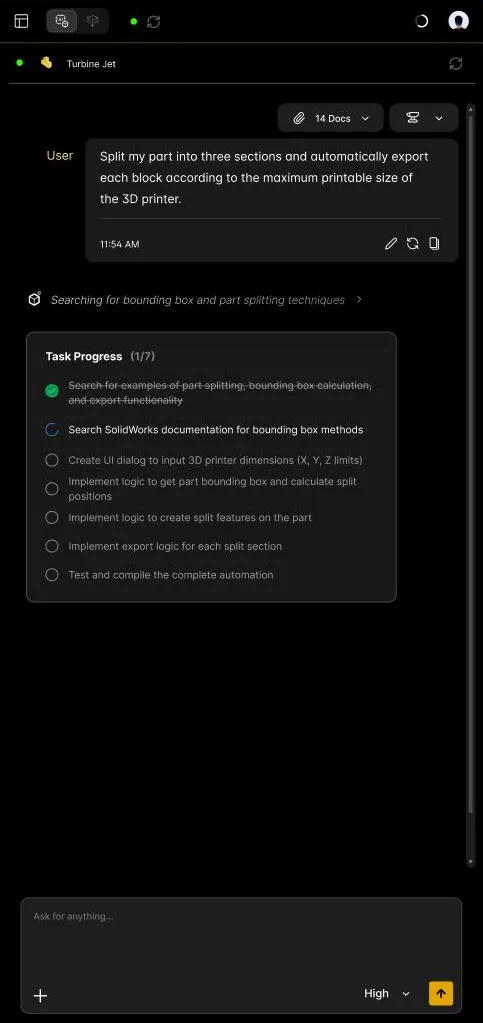
How it works
MecAgent is its own desktop app for Windows. It runs next to the SOLIDWORKS window and connects to the session you have open.
- You write a request in the MecAgent chat bar. You can attach a spec sheet, a PDF, photos, a STEP file, or sketch on a capture of your CAD view.
- The agent builds a plan and shows it as a live Task Progress, with the search steps it runs.
- It acts in your model through dedicated CAD tools: it reads the document, creates real features, mates and drawings, checks the result and corrects itself. You approve each tool execution, or turn on Auto-accept.
- You refine by continuing the conversation: "make the wall 3 mm", "add a fillet on the selected edges".
What it builds is native: sketches, features and mates in the feature tree, which you edit like your own work.
Live in your session, or in the background
| Live CAD Agent | Background Tasks | |
|---|---|---|
| Where it runs | In your open SOLIDWORKS session | On MecAgent's servers |
| Use it when | You iterate and want to see each change, or the work depends on your selection or open assembly | The job is long, you have the input as a file, and you want a file back |
| Typical jobs | Modeling, assemblies, materials, equations, renaming, exports, macros | CAD-to-Drawing, Drawing-to-CAD, Text-to-CAD, STEP-to-CAD, macro generation |
| Your CAD software | Busy with the agent | Free for you; the task continues even if you close MecAgent |
Background Tasks start with the Starter plan.
Macros: the AI thinks once, the script runs forever
When a task repeats, ask for a macro. MecAgent writes and tests it, and you keep it in My automations. The thinking happens when the macro is created: afterwards it runs as a standard script, fast and predictable, with no AI involved at run time. Running a saved automation is free and unlimited.
You can also start from the automations shared by the community, remix one or merge several.
MecAgent, SOLIDWORKS's own AI, or a general chatbot?
They do different jobs, and many teams use more than one.
- Dassault Systèmes' own AI for SOLIDWORKS lives in the vendor's ecosystem and its licensing. MecAgent is independent from it and works alongside it.
- General chatbots (ChatGPT, Claude, Gemini, Copilot) are not built to operate CAD software: asked for a macro, they guess API calls and produce code that often fails in SOLIDWORKS. They remain useful for explaining a concept or drafting a calculation.
- MecAgent is built for acting in the model: it was trained on real CAD workflows and hundreds of thousands of CAD automations, and it reads the result of each step before the next.
More on the difference with a chatbot: MecAgent vs ChatGPT and Claude. For a tool-by-tool view with sources, read AI CAD copilots compared and 15 SOLIDWORKS tasks you should never do by hand again.
What it does not do
- It does not replace the engineer. You keep design intent, validation and release: review geometry, drawings and tolerances before releasing them.
- It does not guarantee the certification or regulatory compliance of a drawing.
- Complex freeform or class-A surfacing from a vague description is out of reach today.
- It cannot apply company rules it was never given. Add your standards, materials and supplier documents as General Knowledges.
- Versions older than SOLIDWORKS 2024 should work, but are not tested or guaranteed.
Get started in three steps
- Download MecAgent for Windows 10 or 11 (64-bit) and create a free account.
- Open SOLIDWORKS 2024, 2025 or 2026. MecAgent finds it on its own: the status dot shows SOLIDWORKS and the Agent as connected.
- Type your first request, with dimensions: "Create a flange with 6 M8 holes, 10 mm thickness, outer diameter 120 mm."
On a company network, ask IT to allow proxy.mecagent.com on port 443.
Your data
On the paid plans, MecAgent does not use your CAD files or requests to train its models. The Free plan is for non-commercial evaluation and includes data collection: the CAD files open in your session are collected and may be used for training. The app says so before you start: a notice that cannot be skipped explains this collection, and you have to read and accept it to access the application. The details, plan by plan, are on the security and data page.
Sources
- MecAgent user guide: what is possible, limits, requirements, how to prompt
- Release notes: what changed in each version
- Pricing and security and data