
A side-by-side comparison of the leading AI CAD copilots, generative design tools, and automation platforms — and how to choose the right one for your engineering workflow.
AI is becoming a real part of mechanical engineering workflows.
The shift in 2026 is not simply that language models have become better at answering engineering questions. AI systems are increasingly able to interact with CAD environments, generate parametric geometry, automate repetitive operations, review engineering drawings, optimize designs, and assist engineers directly inside their existing workflows.
But these tools solve very different problems.
Some act as copilots inside traditional CAD software. Others focus on generative design, simulation, design review, or engineering knowledge.
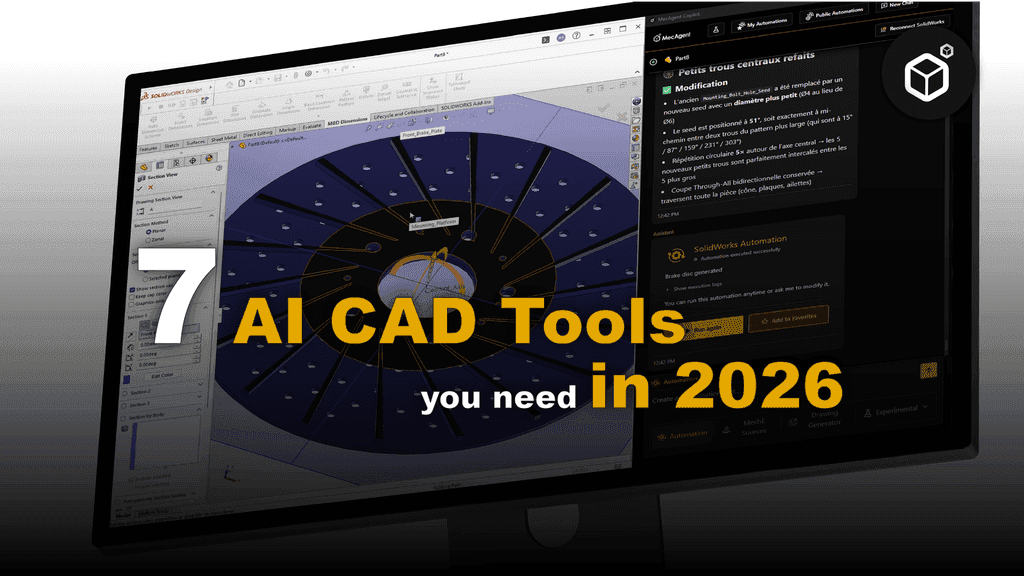
Here are seven AI-powered CAD tools worth evaluating in 2026, what each one does well, and where it fits in a modern mechanical engineering workflow.
What to Look for in an AI CAD Tool
Before comparing products, it helps to separate engineering AI from generic AI.
A useful CAD AI system should ideally answer four questions.
Can it actually interact with CAD?
Generating text about a model is very different from manipulating the model itself.
The most interesting systems can interact with native CAD operations, geometry, feature trees, dimensions, drawings, metadata, or CAD APIs.
Does it produce editable engineering data?
A generated mesh may be useful for visualization, but mechanical engineers usually need editable parametric geometry, B-Rep solids, native CAD features, STEP files, drawings, or manufacturing information.
Can engineers verify the result?
Engineering workflows cannot rely on plausible-looking outputs alone.
Calculations, dimensions, geometry, standards, tolerances, and manufacturing assumptions still need to be inspectable and verifiable.
Does it fit your existing workflow?
A tool that requires engineers to leave SOLIDWORKS, Inventor, Creo, Fusion, or Designcenter for every task may create as much friction as it removes.
The strongest AI workflows tend to integrate with the tools engineers already use.
The 7 Tools
1. MecAgent : AI CAD Copilot for SOLIDWORKS & Inventor
MecAgent is an AI CAD copilot designed to operate directly inside mechanical CAD workflows.
Rather than replacing existing CAD software with a new modeling environment, MecAgent acts as an execution layer between foundation AI models and CAD systems.
Engineers can describe what they want in natural language and use the copilot to generate CAD macros, automate repetitive operations, modify CAD data, create simple parametric models, generate drawings, and perform other actions directly inside their CAD environment.
MecAgent currently exposes CAD automation workflows for SOLIDWORKS and Autodesk Inventor. Its macro-generation system can automate operations including bulk exports, sketching, constraints, saving operations, appearances, drawing operations, and standards checks.
Text-to-CAD
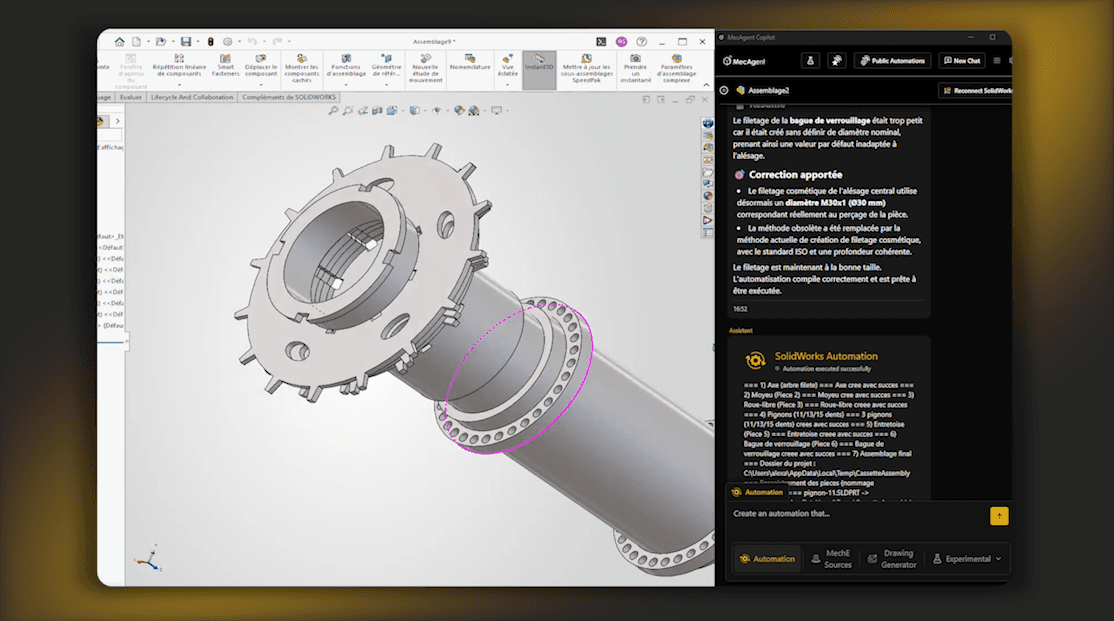
MecAgent can translate natural-language instructions into CAD operations and macros, enabling the generation of simple, editable parametric CAD models rather than only static 3D meshes.
The approach is particularly interesting when the goal is not simply to create a shape, but to create geometry that remains editable inside the engineer's CAD system.
MecAgent also offers an experimental Text-to-STEP/STL system for generating more complex standalone parts from descriptions.
CAD automation
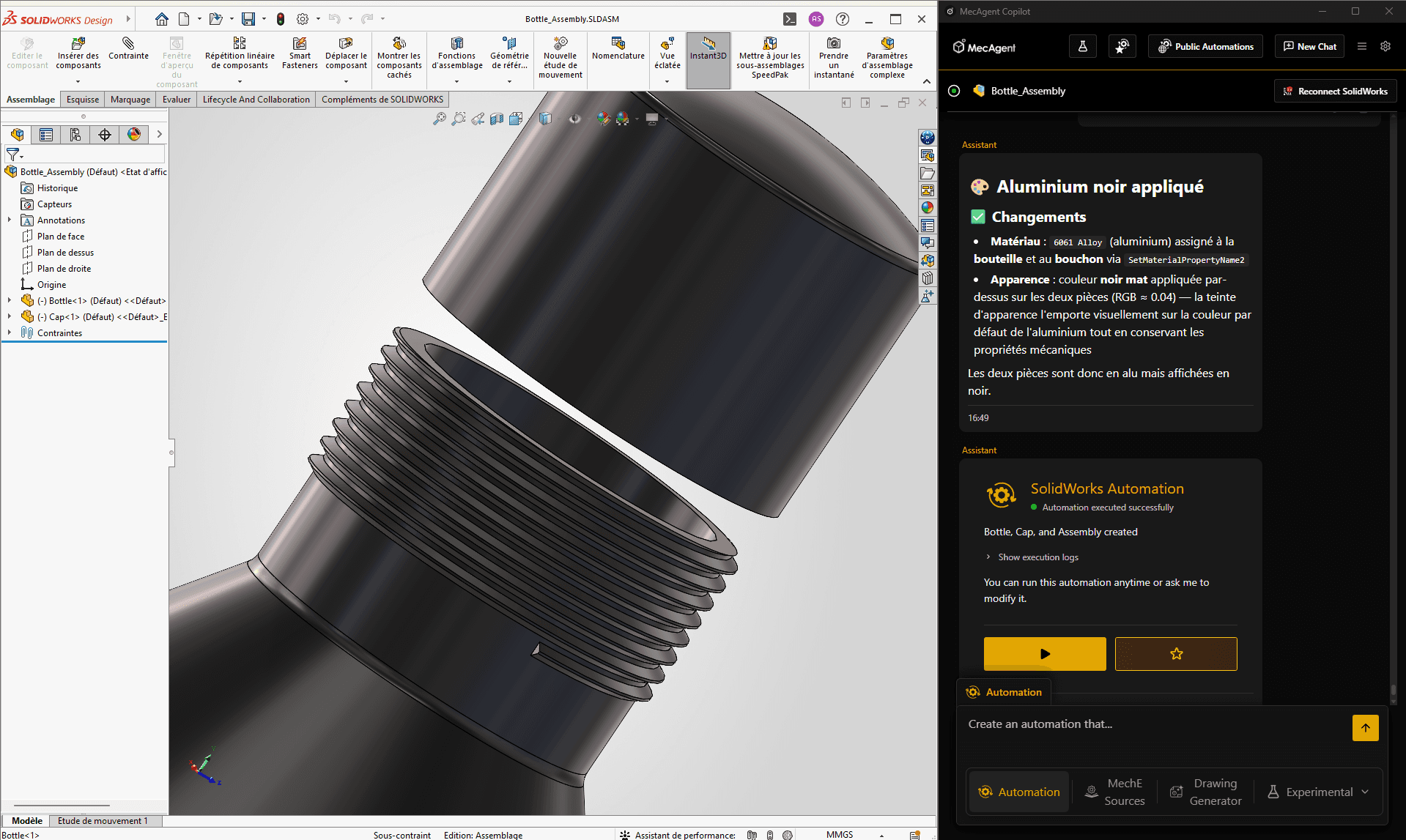
This is currently one of MecAgent's strongest use cases.
An engineer can ask the AI to create an automation for a repetitive operation instead of manually programming against a CAD API.
Examples include:
batch exporting hundreds of parts;
renaming components or features;
changing custom properties;
applying materials or appearances;
creating repetitive geometry;
modifying sketches;
checking CAD data;
generating drawings;
automating company-specific CAD processes.
MecAgent generates and executes CAD automation rather than simply explaining how the engineer could perform the task.
AI drawing generation
MecAgent can also generate engineering drawings directly from CAD models, including views, annotations, tables, and standard drawing elements.
Its standard CAD Copilot drawing workflow focuses on rapid automated drafting, while MecAgent also operates a separate background drawing-generation system for more complete manufacturing drawings.
Mechanical engineering assistant
MecAgent includes an engineering assistant designed around technical workflows such as design guidance, engineering calculations, standards, and best practices, with answers based on engineering sources.
Best fit for: Mechanical engineers and engineering teams already working in CAD who want to automate repetitive work, generate CAD from natural language, create drawings, and give AI the ability to actually act inside their CAD software.
Less suitable for: Teams looking primarily for topology optimization or high-fidelity physics simulation. Those are better handled by specialized tools such as Autodesk Generative Design, Creo GDX, or Ansys.
2. Autodesk Fusion
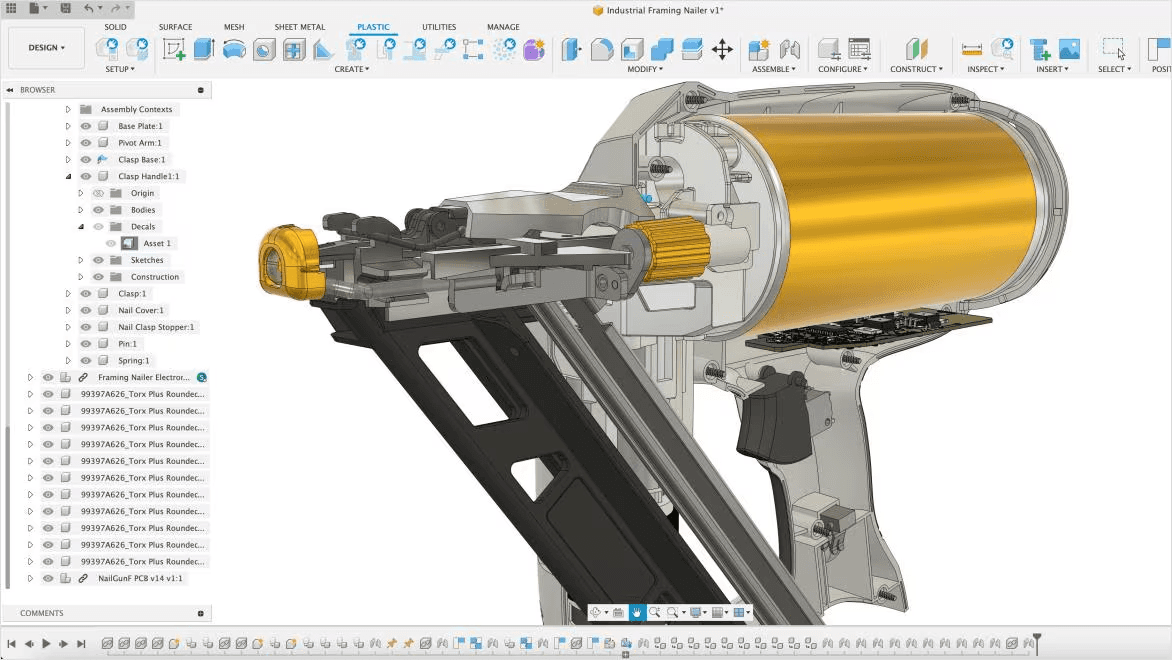
Autodesk Fusion combines CAD, CAM, CAE, electronics, manufacturing, and data management in a cloud-connected product-development platform.
Its AI capabilities now extend beyond traditional generative design.
Autodesk currently highlights three major AI-assisted capabilities inside Fusion:
Generative Design;
AutoConstrain;
Automated Drawings.
Generative Design explores multiple geometry candidates using engineering constraints such as loads, materials, manufacturing processes, and performance objectives.
This makes it particularly useful for lightweighting, topology-driven design, additive manufacturing, and situations where the engineer wants the computer to explore a large design space.
AutoConstrain applies constraints to sketches automatically, while Automated Drawings reduces some of the manual work involved in creating manufacturing documentation.
Best fit for: Teams already using the Autodesk ecosystem, particularly engineers working on optimization, manufacturing, simulation, and integrated CAD/CAM workflows.
Less suitable for: Teams whose primary requirement is an AI agent that autonomously operates an existing SOLIDWORKS or Inventor workflow through natural-language instructions.
3. SOLIDWORKS 2026 + AURA: AI Assistant for Dassault Ecosystem
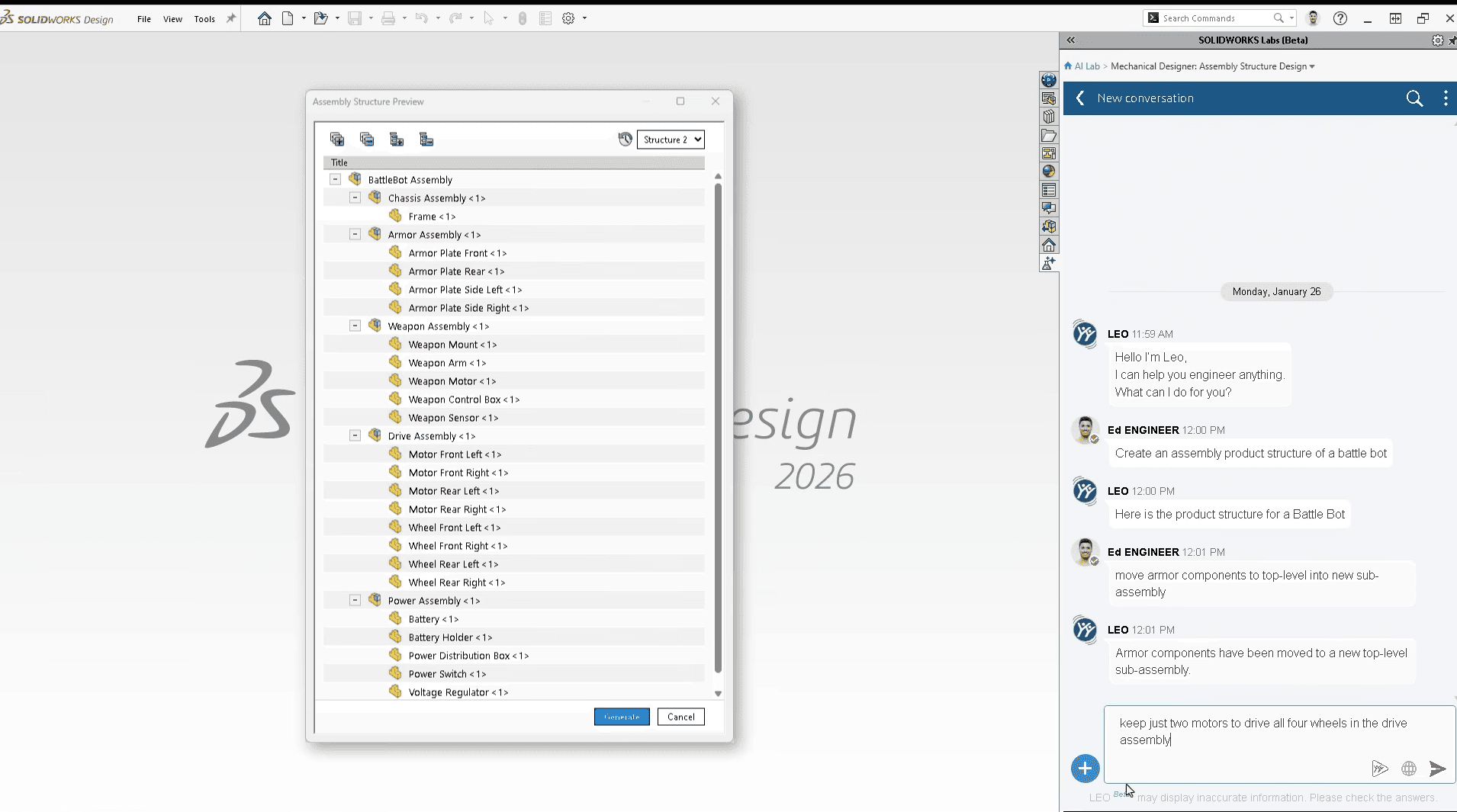
SOLIDWORKS 2026 introduced several AI-assisted capabilities, including AI-powered drawing generation and AURA.
AURA is Dassault Systèmes' AI-powered virtual companion integrated with the 3DEXPERIENCE environment and accessible from SOLIDWORKS workflows.
It is designed primarily to help users access product knowledge, documentation, guidance, and information without leaving their engineering environment.
SOLIDWORKS 2026 also introduces AI assistance in drawing creation alongside hundreds of other improvements to parts, assemblies, sketches, sheet metal, collaboration, and data management.
AURA is therefore different from an autonomous CAD agent.
Its value lies more in contextual assistance and knowledge retrieval around the Dassault Systèmes ecosystem than in delegating arbitrary CAD automation tasks.
Best fit for: SOLIDWORKS and 3DEXPERIENCE users looking for AI assistance tightly integrated into the Dassault ecosystem.
Less suitable for: Engineers looking to describe an arbitrary CAD automation in natural language and have an AI generate and execute the corresponding workflow.
4. CoLab AutoReview
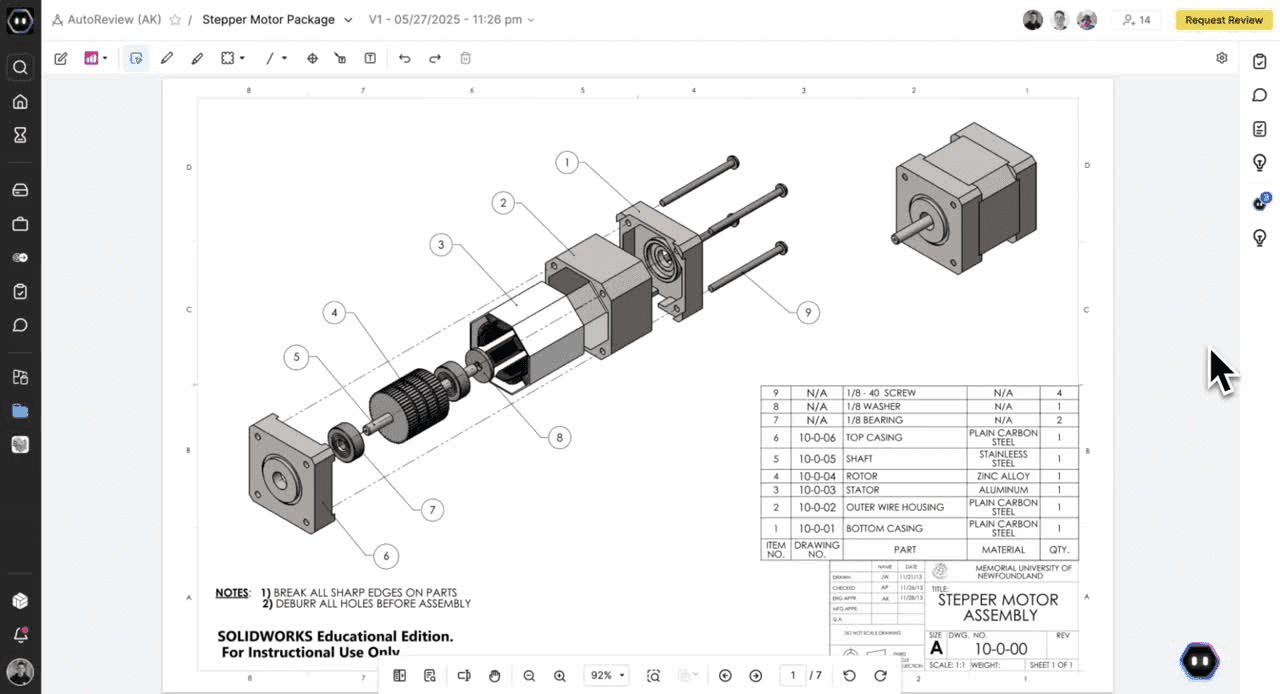
CoLab's AutoReview focuses on one of the most expensive parts of engineering development: design review.
Instead of generating geometry, AutoReview analyzes CAD models and engineering drawings before human review.
The system can check elements such as:
GD&T usage;
hole callouts;
drawing conventions;
title blocks;
material inconsistencies;
BOM inconsistencies;
manufacturability rules;
internal engineering standards;
recurring problems identified in previous reviews.
AutoReview processes technical CAD information including geometry, dimensions, symbols, and metadata rather than treating an engineering drawing as a simple image.
It can then add comments and markups directly to the relevant models or drawings.
In 2026, CoLab has continued expanding the coverage of its specialized agents for automated drawing review.
Best fit for: Engineering organizations with structured peer-review and release processes, particularly companies that want to apply internal design standards consistently.
Less suitable for: Engineers primarily looking for CAD creation or text-to-CAD.
5. Siemens Designcenter
One of the biggest naming changes since early 2026 is Siemens NX.
Starting with the June 2026 release, Siemens renamed Designcenter NX to Designcenter, while the cloud version Designcenter X NX became Designcenter X.
The June 2026 release also puts significantly more emphasis on AI.
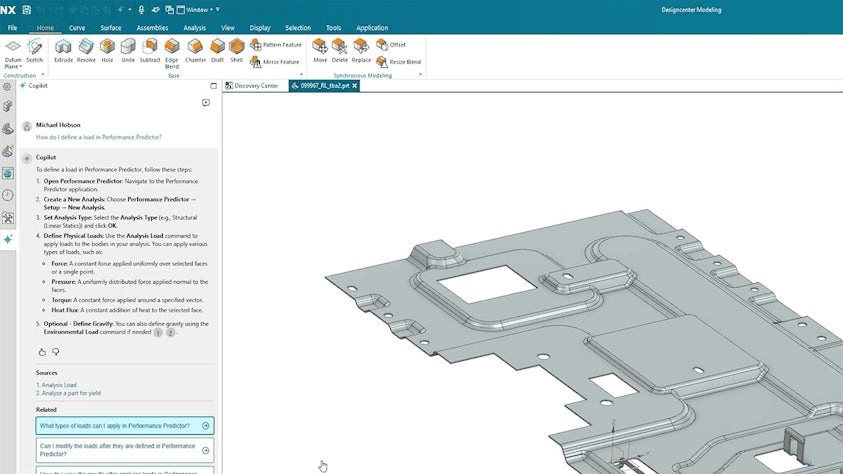
Siemens now describes AI capabilities spanning design analysis, optimization, generation, predictive workflows, and an integrated Designcenter Copilot.
Designcenter Copilot
Designcenter Copilot provides engineering guidance directly inside the environment.
It uses information from Designcenter documentation and best practices while taking into account the user's active application, current task, conversation context, and previous interactions.
This sits on top of several years of AI functionality from Siemens, including command prediction, topology optimization, PMI annotation prediction, and voice commands.
The result is one of the broadest AI integrations available inside a major enterprise CAD ecosystem.
Best fit for: Large engineering organizations already invested in Siemens, Teamcenter, and the wider Siemens Xcelerator ecosystem.
Less suitable for: Smaller teams looking for a lightweight AI layer that can be added quickly to another CAD platform.
6. PTC Creo GDX : AI Generative Design & Topology Optimization
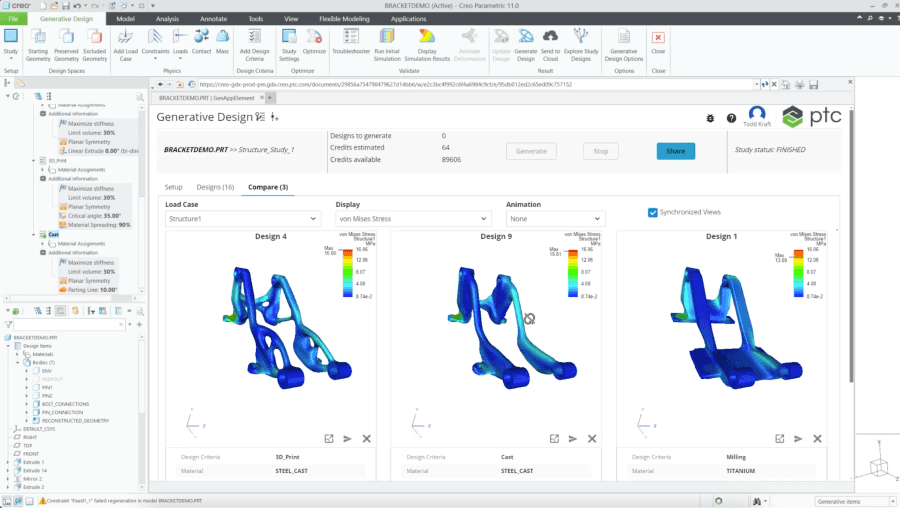
PTC's AI-driven CAD strategy continues to rely heavily on generative design.
Creo provides two complementary systems:
Generative Topology Optimization (GTO) performs optimization locally, while Generative Design Extension (GDX) uses cloud computing to explore multiple design alternatives.
Engineers define objectives and constraints such as:
structural requirements;
material choices;
manufacturing methods;
performance targets.
The software can then explore optimized geometries and help engineers compare alternatives.
One important advantage is that these workflows remain integrated with Creo rather than requiring engineers to export geometry into a separate optimization environment.
PTC also supports manufacturing constraints beyond additive manufacturing, including designs intended for machining, casting, and forging.
Best fit for: Creo users designing highly optimized mechanical components where weight, structural performance, material, and manufacturing constraints are major design variables.
Less suitable for: General-purpose natural-language CAD automation.
7. Ansys Discovery 2026 R1 : an AI-Powered Simulation for CAD
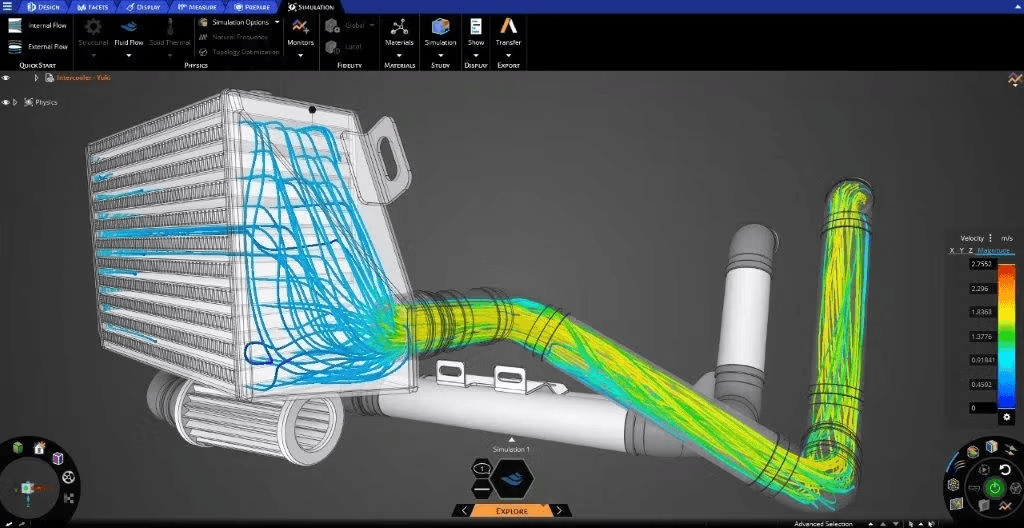
Ansys Discovery sits between CAD and traditional simulation.
Rather than waiting until a design is finished before running heavyweight CAE, Discovery lets engineers evaluate structural, thermal, and fluid behavior earlier in the design process.
As of August 2026, Ansys lists Discovery 2026 R1 as its latest Discovery release.
The 2026 R1 release includes improvements to:
structural simulation;
CFD workflows;
automatic geometry and meshing;
topology and contact handling;
Joule heating multiphysics;
design optimization;
handoff to Ansys Mechanical and AEDT Icepak.
It also expands the Ansys Engineering Copilot with AI-powered guidance, contextual recommendations, workflow validation, and access to engineering learning material.
Discovery is therefore less about asking AI to build a CAD model and more about shortening the feedback loop between geometry and engineering physics.
Best fit for: Engineers who want simulation feedback during design rather than after the geometry is already finalized.
Less suitable for: CAD automation and text-to-CAD workflows.
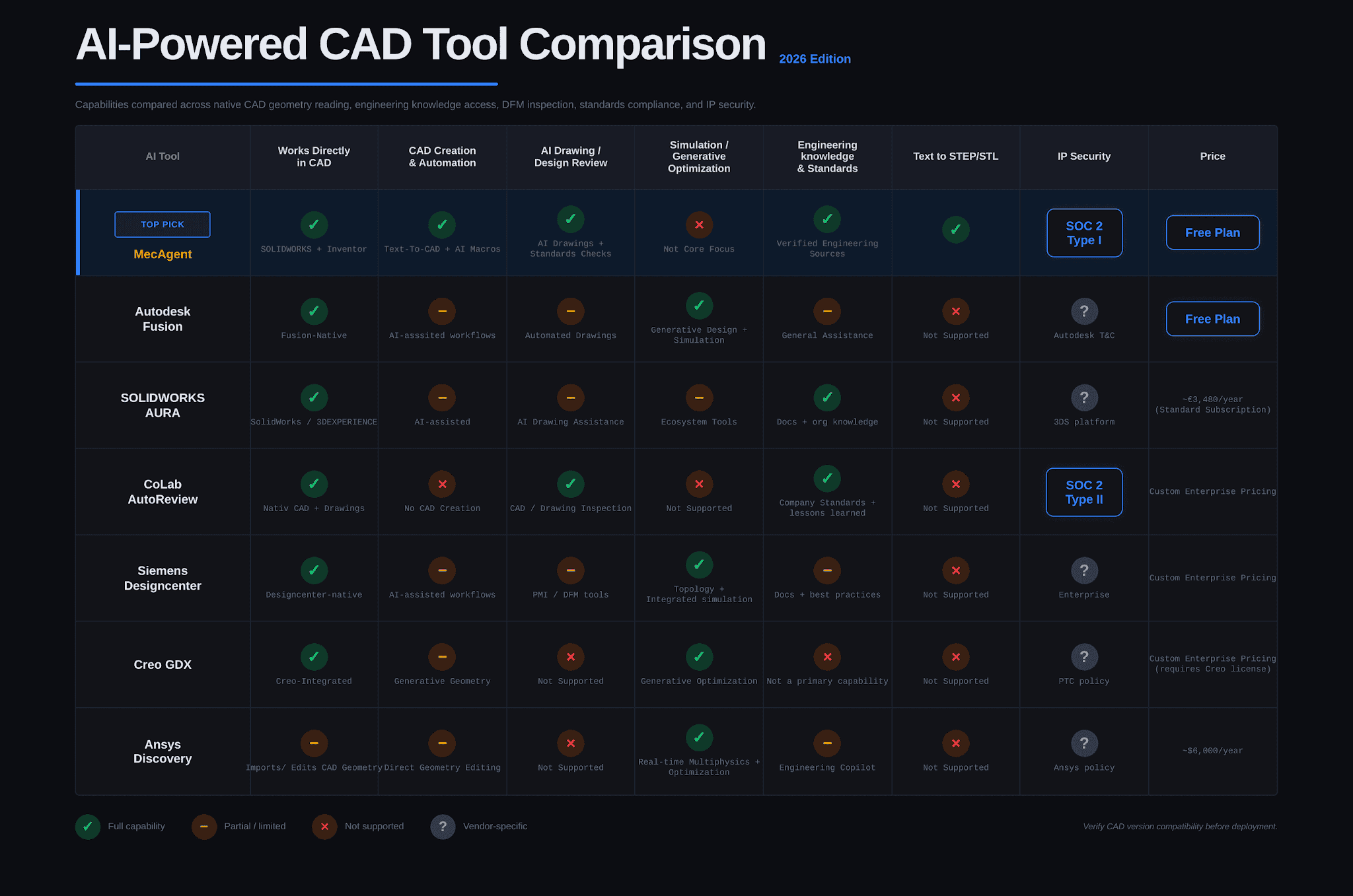
AI CAD Tools Compared
What an AI CAD Stack Looks Like in Practice
Consider a mechanical engineer who needs to develop a new mounting system.
Instead of using a single AI product for the entire process, different systems can handle different layers.
The engineer might first use MecAgent inside the CAD environment to automate creation of an initial parametric model, generate repetitive features, or build a custom automation for the project.
If significant structural optimization is required, Autodesk Generative Design, Creo GDX, or Designcenter can explore alternative geometry.
During detailed engineering, Ansys Discovery can provide rapid structural or thermal feedback.
Before the design is released, CoLab AutoReview can perform an automated first-pass review against company standards and previous engineering feedback.
The important point is that "AI for CAD" is not one category anymore.
CAD automation, generative design, simulation, engineering knowledge, drawing generation, and design review are becoming separate AI layers inside the engineering toolchain.
The Most Important Question Before Buying an AI CAD Tool
The question is not:
How impressive is the demo?
The better question is:
What happens when the AI is wrong?
A CAD model can look completely correct while containing incorrect dimensions, fragile references, poor feature dependencies, impossible manufacturing assumptions, or invalid engineering decisions.
For production engineering, AI output needs to remain inspectable and editable.
Engineers should be able to review the feature tree, geometry, calculations, drawings, references, and assumptions before anything moves into manufacturing.
This is particularly important as AI systems become capable of executing increasingly long sequences of CAD operations autonomously.
Which AI CAD Tool Should You Choose in 2026?
There is no single "best AI CAD tool" for every engineering team in 2026.
The right choice depends on which part of engineering you want to accelerate.
If you want AI to operate and automate your existing mechanical CAD software, MecAgent is one of the most direct approaches.
If you want generative geometry optimization, Autodesk Fusion and Creo GDX are strong options.
If your company is deeply invested in a large enterprise CAD environment, SOLIDWORKS + AURA and Siemens Designcenter increasingly bring AI directly into those ecosystems.
If the bottleneck is design review, CoLab AutoReview is purpose-built for it.
If the bottleneck is engineering simulation and design validation, Ansys Discovery provides fast physics feedback earlier in development.
The biggest shift in 2026 is that AI is moving from answering engineering questions to actively participating in the engineering workflow.
FAQ
What is the best AI CAD software in 2026?
It depends on the task. MecAgent focuses on AI-driven CAD execution and automation inside SOLIDWORKS and Inventor, Autodesk Fusion and Creo GDX focus heavily on generative design, CoLab AutoReview focuses on design review, Siemens Designcenter provides enterprise CAD AI capabilities, and Ansys Discovery focuses on simulation-driven engineering. There is no single winner, the right AI CAD tool depends on which part of the workflow you want to accelerate.
Can AI generate real, editable CAD models?
Yes, but the type of output matters. Some tools generate meshes or neutral 3D formats meant mainly for visualization, while others like MecAgent's text-to-CAD, create editable parametric geometry or manipulate native CAD environments directly. For mechanical engineering, native or editable CAD output is generally far more useful than a static 3D mesh, since it can still be modified inside SOLIDWORKS, Fusion, or Creo.
Can AI replace a mechanical CAD engineer?
Not today. AI can already automate a substantial amount of repetitive CAD work, generate initial geometry, create automation scripts, assist with drawings, review designs, and accelerate simulation. But the engineer is still responsible for design intent, engineering judgment, validation, manufacturability, safety, and final approval.
What is the best AI tool for SOLIDWORKS in 2026?
SOLIDWORKS 2026 includes Dassault Systèmes' own AI capabilities such as AURA and AI-assisted drawing features. MecAgent also works as an external AI CAD copilot for SOLIDWORKS, generating and executing CAD automation and text-to-CAD workflows through the SOLIDWORKS API. The right choice depends on whether you want AI knowledge assistance (AURA) or AI that actively creates and automates CAD work (MecAgent).
Which AI CAD tool is best for CAD automation?
For arbitrary natural-language CAD automation, MecAgent is specifically built around translating engineering instructions into operations and CAD macros for SOLIDWORKS and Inventor. Major CAD platforms such as Fusion, SOLIDWORKS, Creo, and Designcenter also increasingly include AI-assisted automation, but their capabilities and approach differ substantially, most focus on assisted workflows rather than fully autonomous execution.
Is AI-generated CAD ready for manufacturing?
For simple and well-defined workflows, AI-generated CAD can already provide useful production-grade starting points. For complex engineering parts and assemblies, human verification is still essential. Geometry generation is only one part of mechanical design, material selection, tolerances, GD&T, loads, interfaces, manufacturing processes, assembly requirements, and safety constraints still require engineering validation.
MecAgent Inc.
Download the Beta
Book a Demo
Download (Free)
Book a Demo
Other articles you might like
Learn how to increase your productivity with calendars
“Mythos.1” - Class AI in Mechanical Engineering and CAD Design
MecAgent Inc.
AI CAD Copilots in 2026: 7 Tools Compared for Mechanical Engineers
MecAgent Inc.
Claude Fable 5 x MecAgent 1.2.0 on CAD
MecAgent Inc.
Features
Pricing
AI CAD Community
Careers
Contact